How to Make a Gas Station Dance Video With Three Photos
Choose the three roles, upload the right files, check the credit cost, and review the full result. Includes the actual example and common upload fixes.
Last updated: 2026-10-05
To make a video, assign three solo photos to the dancer, selfie and car-exit roles, select a resolution, then choose Generate. Each generation uses 100 credits. Download the finished MP4 within 24 hours of order creation.
Watch the full example before buying: this workflow makes a new gas-station scene with generated audio, not an exact replacement of the people in the original clip. Use photos of consenting adults; no prompt or filmed dance is needed.
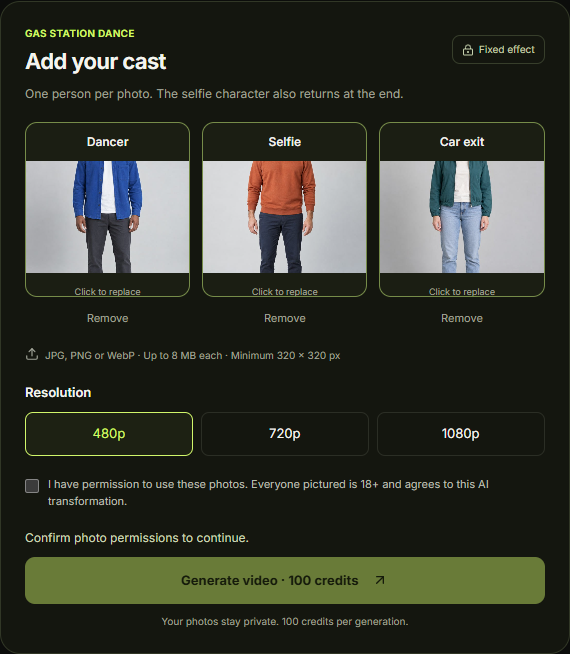
The three role slots in the generator. Check the cast before choosing Generate.
1. Choose the cast before choosing the photos
Decide who opens the dance, who appears in the selfie view, and who comes out of the car. The selfie role returns at the end of the demonstrated sequence, so give that slot to the person you want on camera twice.
For a birthday joke, the guest of honor could be the car-exit reveal. Or put them in the selfie slot if you want them to bookend the later scenes. These are creative choices, not different generation modes.
Use consenting adults and keep the result clearly framed as an AI-made joke, rather than evidence that they were actually there.
2. Upload one person into each slot
Open the generator. The first slot is the dancer, the second is the selfie character, and the third is the car-exit character.
The uploader accepts JPG, PNG and WebP, with an 8 MB file-size limit per photo. Both dimensions must be at least 320 pixels. Images above 36 megapixels or with an extreme panoramic/narrow shape are rejected. A HEIC photo from your phone will need to be exported to a supported format. Changing its filename to .jpg is not a conversion.
Choose a photo in which you can see the intended person's face without zooming far in. A group shot forces an unnecessary choice about which face matters. The role-photo guide shows the actual portraits used for our example.
Check all three previews. If you selected the wrong friend or the wrong role, replace that photo before continuing. You do not need photos taken at a gas station.
3. Check the output setting and credit cost
Choose an output resolution in the generator. The published example uses 480p; 720p and 1080p are also listed in the interface, but their output has not been tested for this guide.
Each video uses 100 credits. The single-video pack costs $8.90 USD for 100 credits. Available credit packs: 100 / 400 / 1000. Check current prices and the checkout total before buying. Pricing.
Choose Generate after reviewing the previews and consent checkbox. If you are signed out, the site asks you to sign in. If you lack credits, it presents the purchase step. Watching the example is free; generating your own video requires paid credits.
4. Follow the existing task instead of repeatedly submitting
After submitting, follow the task in My videos. You can return to the existing task after refreshing. While it is queued, generating or being checked, wait for its status to change instead of submitting another request.
After a confirmed generation failure, the credits used for that task are restored automatically. If the status or credit balance remains unclear, use the task's support action or contact support. A confirmed generation failure and a refund of a purchased credit pack are different issues; the refund policy explains the latter.
We do not yet have enough timing data to give a typical wait. Use the task status to check progress.
5. Review the whole video before downloading or sharing
Use the result player, then download the MP4 when available. Check four things:
- Opening: is the dancer the person you intended?
- Camera turn: is the selfie character recognizable?
- Car exit: does the third character appear, and do the body and door movement look acceptable?
- Ending: does the intended selfie character return?
Listen as well as watch. Our example contains generated audio, not a guaranteed copy of the original trending track. If a specific song matters, plan a separate editing step and check the track's availability and permitted use in your posting app.
Download the MP4 before file access expires, 24 hours after order creation. The deadline starts when the order is created, not when generation finishes. Keep your downloaded copy for later editing or sharing.
Upload problem? Start with the file, not another payment
Unsupported format: export the photo as JPG, PNG or WebP and upload the exported file.
Over 8 MB: save a smaller copy. Keep enough detail to inspect the face; do not reduce it to a tiny thumbnail.
Damaged image: open it in a normal photo viewer. If it will not open, export another copy or choose a different photo.
Invalid dimensions: choose an image at least 320 × 320 pixels and no larger than 36 megapixels. Use a normal portrait or landscape crop, not a panorama; enlarging a tiny face does not restore its detail.
Wrong person in a preview: replace the input in that role. Do not expect a prompt to correct a photo assigned to the wrong slot.
Video will not play: try the player's retry or open-video option. If playback still fails, contact support before buying another generation.
Interface and file limits checked October 5, 2026. For the tested output, method and limitations, see the single-generation case study.